
The floor buttons
On the right rail there's a stack of floor buttons:
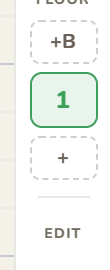
| Button | What it does |
|---|---|
| 1, 2, 3 | Go to that floor. The one you're on is highlighted. |
| B | Go to the basement. |
| + | Add a floor on top. It disappears once you have Floor 3. |
| +B | Add a basement. It disappears once you have one. |
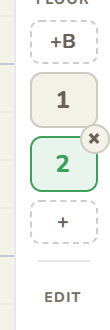
| × | Appears next to the top floor or the basement when it's empty. Removes it. |
Add a floor
Click +. You go straight to the new floor, and it's empty.
Placing a stair adds the floor for you. If you're going to have stairs, you can skip the + button.
What you'll see on a new floor
A new floor starts with no walls at all. A faint ghost of the floor below shows through, so you can draw on top of it. See The Underlay.
On a new empty floor above a floor with outside walls, a card offers Copy the outside walls from below. Tap it to copy them up in one step, or ignore it and trace the ghost. No thanks hides the card.
Removing a floor
You can only remove the top floor or the basement, and only when it's empty: no walls, doors, furniture, floors, labels or rugs, and no stair leading to it. Then a small × appears next to its button.